Book an Appointment
Call West Palm Beach Computer Repair Service at 561-208-8005
                   

(561) 208-8005

*


West Palm Beach Computer Repair Service has provided the best mobile computer repair in West Palm Beach, FL and the greater Miami Metropolitan Area since 1999. The term "mobile computer repair" means we come to you to resolve all your computer problems.

We repair laptops, desktops, PCs and Apple computers. One of our highly qualified staff will come to you, often the same day, to take care of all your repair needs.

Why not use the #1 rated company for computer repair in West Palm Beach, FL?

Computer Repair 4.9 / 5 stars from 324 reviews
Why use a computer tech when you can have a West Palm Beach based Computer Engineer? Mon-Sun 8:00am - 8:00pm

Call us at (561) 208-8005

Text us at (561) 208-8005

Email us your questions

Book an Appointment

"Great service and friendly staff. Got my computer fixed same day, thank you!"
West Palm Beach Computer Repair Service 5 / 5 stars
"Dustin, the technician, did an awesome job. He kept me informed along the job. Techs like Dustin, make me a customer for life. "
West Palm Beach Computer Repair Service 5 / 5 stars
"Wonderful service, from the initial phone call and scheduling, very upfront on costs. The tech showed up on time, with a 15 min courtesy call, he was professional, knowledgeable and gave great advice. He replaced my hard drive and got me back up and running. I would recommend this service. I chose it because of all the positive online reviews and I was not disappointed."
West Palm Beach Computer Repair Service 5 / 5 stars
"Josh was again superb. He reinstalled my HP printer software and now I can scan once again. Much thanks for your service."
West Palm Beach Computer Repair Service 5 / 5 stars
"Fast service! Fixed all of my computer problems and was very helpful in making suggestions on products I needed. He arrived on time and was professional. Overall a very pleasant experience and I will call again!"
West Palm Beach Computer Repair Service 5 / 5 stars

Who is West Palm Beach Computer Repair Service?

West Palm Beach Computer Repair Service is owned by Matt Karls, an Electrical Engineer and a Computer Systems Engineer. We are a team of computer professionals focused on Service and quality, all our work is guaranteed.

If you have any computer, technology or IT problem in West Palm Beach, FL we can fix it. We have been performing computer repair in West Palm Beach full time since 1999. Feel free to give us a call or text us at (561) 208-8005.

West Palm Beach Computer Repair Service's Computer Engineer

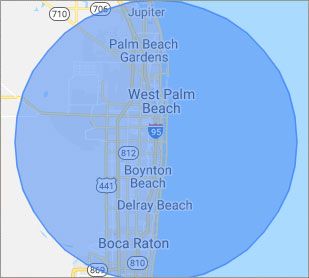
What is your Service Area for on-site Computer Repair?

Our primary on-site mobile service areas include the greater Miami Metropolitan Area as well as the Tampa, Orlando and Jacksonville metro areas.

We provide remote and mobile computer repair in West Palm Beach, Fort Lauderdale, Hialeah, Hollywood, Pembroke Pines, Miami, Miramar, Coral Springs, Miami Gardens, Pompano Beach, Davie, Boca Raton, Sunrise, Plantation, Miami Beach, Deerfield Beach, Boynton Beach, Weston and Coral Gables.

Our on-site Computer Service Area

What should someone expect that hires you for Computer Service?

Our mission is to fully resolve your computer problems quickly and affordably. If you want a Computer Engineer that can fix all of your computer problems instead of a computer tech, a computer geek, a technician or a computer guy that can only fix some of your problems; call us at (561) 208-8005.  

What types of Computer Services do you perform?

We service businesses and business clients in their homes, including:
 
  • Diagnose / repair hardware or software problems
  • Spyware, malware, trojan and virus removal
  • Setup wireless and small business networks
  • Laptop repair, PC repair and Apple repair
  • Hard drive data recovery

West Palm Beach Computer Repair Service Contact Information

West Palm Beach Computer Repair Service
West Palm Beach, FL 33401
(561) 208-8005

West Palm Beach Computer Repair Service is a Karls Technology company

* *
*
*
*
  *
* *


*
*
* * * * * * * * * * * * * * *
4.9 / 5 stars from 324 reviews

"Great service and easy to work with!!!"

West Palm Beach Computer Repair Service 5 / 5 stars

"Anthony was very helpful in each step of the process, very professional."

West Palm Beach Computer Repair Service 5 / 5 stars

"My tech was great and appeared knowledgeable, I won't hesitate to contact again and I would highly recommend."

West Palm Beach Computer Repair Service 5 / 5 stars

"Taylor worked through 6 PC systems with great ease. Very satisfied with his skills and his help servicing our systems."

West Palm Beach Computer Repair Service 5 / 5 stars
Best Antivirus Software of 2026: The Ultimate Guide to Cybersecurity Brands

In 2026, the digital threat landscape has shifted. We are no longer just fighting simple viruses; we are defending against AI-generated phishing, sophisticated ransomware-as-a-service, and complex identity theft. Choosing the right antivirus brand is no longer optional—it is the foundation of your digital life. At Karls Technology, we’ve analyzed the top-performing security suites of the […] The post Best Antivirus Software of 2026: The Ultimate Guide to Cybersecurity Brands appeared first on Computer Repair Blog.

Windows Search Tool

Windows search is the most efficient method to utilize when looking for certain files, documents, or applications using a keyword. As a short cut, it gets the job done well. Windows 11 systems use a “magnifying glass” symbol for Windows Search on the taskbar, while Windows 10 computers feature a search box. If you type […] The post Windows Search Tool appeared first on Computer Repair Blog.

End of Service for Windows 10 21H1

Windows 10 21H1 will be discontinued in three months, on December 13, 2022, as per a notice sent out to customers by Microsoft. Microsoft announced the end of security updates for devices running Windows 10 21H1 (the May 2021 Update) in an article released on Wednesday. In order to protect themselves from attacks that take […] The post End of Service for Windows 10 21H1 appeared first on Computer Repair Blog.

New Microsoft Defender SmartScreen Feature

In an effort to ward off phishing attacks and encourage users to use strong passwords, Microsoft released Defender SmartScreen. The Windows 11 22H2 update, which Microsoft issued at the end of the previous month, included a new feature that should make it easier for users to keep their credentials secure. When logging into an app […] The post New Microsoft Defender SmartScreen Feature appeared first on Computer Repair Blog.

Guide to Antivirus Brands in 2025

Karls Technology’s Comprehensive Guide to the Best Antivirus Brands in 2025 In today’s digital age, cybersecurity is more critical than ever. With the increasing number of cyber threats, from malware and phishing attacks to ransomware and identity theft, having reliable antivirus software is a necessity. The market is saturated with numerous antivirus brands, each offering […] The post Guide to Antivirus Brands in 2025 appeared first on Computer Repair Blog.

Force Quit on MacOS

Control-Alt-Delete is the same thing as Option + Command + Esc in macOS. Make use of this keyboard shortcut to bring up the window to force quit applications, which will allow you to view what programs are currently active on your computer. You also have the option of selecting Force Quit from the Apple menu. […] The post Force Quit on MacOS appeared first on Computer Repair Blog.

Update Routers to Prevent Bricking

Routers need firmware, like computers and phones. Like other devices, your router’s firmware must be updated. Many firmware updates are security remedies for router vulnerabilities. Hackers could take over your network through these weaknesses. You must periodically visit the “Support” area of your router’s manufacturer’s website for firmware updates. New updates should be implemented as […] The post Update Routers to Prevent Bricking appeared first on Computer Repair Blog.

Smart App Control on Windows

Microsoft’s newest Windows 11 update (22H2) came with a plethora of new features. One in particular is the Smart App Control, or SAC. What is SAC? According to Microsoft, the capacity of Smart App Control to terminate potentially dangerous or otherwise unreliable applications enables an effective defense against new and unanticipated threats. With the SAC, […] The post Smart App Control on Windows appeared first on Computer Repair Blog.

Closing Windows with Shortcut

Pressing the Windows key + D instantly minimizes all open windows. By doing it this manner, you can avoid manually closing each window. To restore any minimized windows to their original position, hit the Win and D keys simultaneously. The desktop can be accessed by hitting the Windows key and the letter M. Apps like […] The post Closing Windows with Shortcut appeared first on Computer Repair Blog.

Multitask Using Task View

Having numerous virtual desktops might be very helpful if you only have access to a single monitor and are trying to do several tasks at once. In Windows 10, you can find this option in the Task View section. The Windows 10’s Task View feature allows you to use numerous programs at once in a […] The post Multitask Using Task View appeared first on Computer Repair Blog.